The LUMI AI Software Environment
Presenters: Marlon Tobaben and Mitja Sainio (CSC/LUMI AI Factory)
Q&A
-
Are there also pre-built containers for JAX?
- Not yet. They will come at some point, but JAX can be a pain to install so it will require a lot of testing. With PyTorch 90% or more of the AI software use on LUMI is covered so it is clear why this comes first.
-
What is the benefit of building your own container if you can get all the software through pip env
-
If you install a package directly on the file system, such as in a venv outside the container, you will put the file system under strain and you might hit the file number quota of your project (which is put in place because of the file system issues). If you have all packages inside the container, the file system only sees one single file resulting in better file system performance (such as no "lags" or "hangs")
-
By having everything in the container you also avoid any issues with figuring out which venv or squashfs image is supposed to be used with which version of the AI factory containers. It likely improves the reproducibility and portability of your computational experiment.
-
-
Can we have also the python version in the sif filename?
-
I'll let the LAIF people correct if needed, but it is the default version of Python for the version of Ubuntu. So in some sense, it is included...
-
And if you use the containers directly from
/appl/local/laifs/containers, you can check the Python version very quickly withsingularity run <name of the container file> python --versionand see what Python packages are in it with
singularity run <name of the container file> pip --versionYou don't even need to load the bindings module
lumi-aif-singularity-bindingsfor it.
-
-
Could we document the relevant URLs (e.g. the
lumiaifactoryDocker hub) here?- The documentation of the LAIF software has its own pages in the LUMI documentation. See the "AI Software Environment page". There is also a link to the Docker Hub there.
-
There is a lot of the original outdated information scattered around Lumi docs, Software > Pytorch or nccl etc. Is the AI Factory in the position to go through these pages and revise it? +1
- The pages outside the LAIF section are the responsibility of LUST. And these pages are not outdated. They may not be relevant to you if you use the LAIF containers, but they are still very relevant to other users who are still on the previous containers or want to use RCCL in different ways. There is more software than just PyTorch that needs RCCL.
-
Will these AI containers also work with uv or are they tied to conda?
- They are not using Conda at all but are built with pip on top of Python. In some cases, wheels were compiled specifically for LUMI and then installed with pip. The documentation also describes how to extend the container and the suggested way is via pip, either adding to the virtual environment in the container (but that requires a rebuild which is slow) or in a separate environment. The upcomming intro course and AI training will also tell more about this.
-
In follow-up to the previous question, is it possible to directly port a pytorch ML repository that has a
pyproject.tomlfile and usesuv, or does the environment need to be manually ported?-
As far as I am aware,
pipshould work with apyproject.tomlfile. Usinguvwith the containers has not been tested, but that doesn't mean it won't work, so maybe you can try it out. However, if you need particular fixed versions of your dependencies, that might conflict with those already included in the container. If that is the case, starting from one of the "earlier" containers in the LAIF stack (e.g. the basic PyTorch without any additional libraries) and built your environment based on that. - Lukas -
But if you start from scratch: You have to be careful with some packages to ensure that you get a wheel for ROCm, and for the proper ROCm version.
Also, we've seen that some wheels contain already the ROCm libraries they need, that may then interfere with versions of these libraries already in the container. And this, e.g., may lead to RCCL not finding the proper plugin for optimal performance on the network of LUMI.
-
-
Should we build the containers in the login nodes? or should be run an interactive job and build the containers on a compute node?
- You cannot build them from the recipes in GitHub on LUMI as that requires a build process that requires privileges that are not granted on LUMI. You can do singularity builds on top of the existing containers. Some will work on the login nodes, but extending the full container requires so much memory that it has to be done on an exclusive node.
-
Are there benchmark tests for newly released containers?
- Yes. You can find them in the LAIF laifs-container-tests GitHub repository.
-
Is it possible to include containers inside a container? I.e., can we create small containers and bundle them up on a bigger one depending on the specific workflow?
-
This may be difficult. Each container usually comes with a somewhat complete stack of system libraries, so the completed containers are not that modular. However, you can try to combine the definition files, or build in layers adding additional functionality in each step (similar to how the presented LAIF containers are designed).
Running a container in a container does not work and would not give you what you expect, as each container is an isolated environment and cannot use files from outside the container unless they are bind mounted.
You could use SquashFS overlays on top of an existing container, but this would probably not work every well also, as each layer would rely on the layers below being always present, and as you may introduce dependency errors if you put such a layer on top of a layer for which it was not intended.
-
-
If one creates a container, can others access and utilize it as well? How about people from other projects?
-
If you want to share the container with other people from the same project, you can leave it in the project or scratch directory of your project. If you want to share the containers with other users, including the members of the LUMI user support team, you can use LUMI-O.
-
Or you just need to copy the SIF file to a place where the other person can read the file. Be careful if you want to share a SquashFS file with a virtual environment extending the container, you need to prepare that SquashFS file and that virtual environment in a special way. We're working on better training materials; some will debut in the intro course in Riga.
-
-
Extending the previous question, would it be possible to share the containers via dockerhub?
-
If you build a container, you can of course upload it onto Docker Hub. You just need to create an account and repository. Our containers are MIT-licensed, so fire away. –Mitja
-
The LAIF containers are on Docker Hub. The URL is in the presentation and in the documentation.
-
-
Can the images built through podman be uploaded to docker hub ?
-
Yes. The command is
podman push. You need to runpodman loginfirst, though. –Mitja -
But to use them on LUMI you'll need to convert them to singularity using
singularity pull.
-
-
What is the difference between using a container and say
module load pytorch?- The "module load pytorch" actually made a Python in a container available through some wrapper scripts around Python and so on. It just made a few steps in launching the container easier, and tried to hide the container a bit.
-
Will the LUMI AIF provide some information about differences when e.g. ROCm versions are changed?
-
You can check the GitHub release page of the containers for the latest release, which also contains a list of the version numbers of the major packages and libraries.
We try to keep our guides up-to-date with regards to changes when ROCm™ versions change, but maybe we could add an extra resource for changes like that when versions change. Thanks for the feedback. We will consider. - Lukas
-
-
Are there definition files available for the images here on LUMI:
/appl/local/containers/sif-images?-
That path is for the older AMD-built containers. The LUMI AIF containers are found under
/appl/local/laifs/containers. We use Podman, not Docker, for building the containers. The Podman Containerfiles (analogous to Dockerfiles) can be found there. There are also Apptainer definition files in the directories we use for exporting the Podman-built OCI containers into SIF image files for use on LUMI. –Mitja -
And the information is also in the GitHub repository shown in the presentation and in the LUMI docs.
-
-
When I look at the LUMI documentation, it's not very easy to navigate to the Lumi AI Factory page its not there on the central page, it's not there under software, I can imagine a lot of users be redirected to the older Pytorch info in the Software section. Could this be slightly better organized to increase the success of new AI users arriving to LUMI? (mobile page) but arguably it should be somewhere under software?
-
The LUMI AI factory is in the top menu so I cannot see how you can overlook that? Unless you are using a very small screen, when it is indeed hidden in a "hamburger menu". And at the top of the older PyTorch section in the LUMI Software Library, there is a box that tells you to have a look at the LAIF documentation, with a link to that documentation. If you type "pytorch" in the search box, the first hit is also the LAIF page with information on how to run PyTorch.
There is a mentioning of PyTorch also on the Installing Python packages page but that is relevant there for users who want to make their own installation, and to tell them not to do so on the filesystem.
The software pages mention in the left column the "Software library", but as said above, if you go to PyTorch in that page it will tell you that the newest installations are the LAIF containers and take you to that documentation. And the left column also explicitly mentions the LAIF AI containers.
-
You should understand that LUMI is not only for AI users and so we cannot make a documentation site that only talks about basic AI stuff. And many of the general pages contain essential information for a part of the AI community also.
-
Thank you for the feedback. We are constantly aiming to improve our user documentation, and welcome any feedback and suggestions for improvements. It's a good point that the view with mobile phone to the menu is not ideal, at least.
-
-
If you want to have an LLM, should you include the LLM inside the container? or just vLLM and then download the model at runtime?
- You should bind mount the target directory for your models and download them at runtime.
Loading the
lumi-aif-singularity-bindingsenvironment module will bind practically every directory you would ever need for jobs. –Mitja
- You should bind mount the target directory for your models and download them at runtime.
Loading the
-
Following the previous question, is there or will be a LLM repository in LUMI, so we can mount the LLMs faster?
- I don't think maintaining a comprehensive repository of models is viable, since there are so many of them available on Hugging Face. It would live on the shared file system anyway, so loading a model into memory would take the same amount of time. –Mitja
-
Are there any simple examples, which starts from a local trained toy ML problem, which is then packed inside an apptainer container and offloaded to LUMI?
-
The LUMI AI Guide contains examples.
-
Training materials of the last AI course. Sometime in the second half of June you'll find a new training there which will be based on the LAIF containers.
-
-
Is there any difference in the image that is provided by LUMI for ROCm™ as compared to one built by me from docker hub :
Where can I get the ready-made ROCm™ image provided by the LUMI AI factory ? Docker hub does not contain that image.Bootstrap: docker From: rocm/dev-ubuntu-22.04:6.1.1 -
There are files for singularity in
/appl/local/laifs/containersand they are on Docker Hub also if you use the right tag. -
lumi-multitorch:rocmis an intermediate container with just ROCm™ libraries. Here's the Containerfile template, you can see there's not much else there. –Mitja -
What's the recommended way to transfer a single super large dataset file, like 500GB, to the lustre? We've used
winscpbut that gets easily interrupted by the network condition.-
Upload data to LUMI-O and move it to the filesystems from there. Consider using tools like
rcloneors3cmdfor best performance. For a single file, s3cmd may be the best choice. -
See also the "Getting Access" and LUMI-O lectures in the intro training. Check here for the most recent one with full materials available.
-
-
We recently migrated from environment (we will move this to a ticket):
- LUMI-provided
ROCm 6.0.3base container +torch 2.3+pytorch_lightning(installed withcotainr)
to
- LUMI AIF provided
lumi-multitorch-torch-u24r64f21m43t29-20260225_144743container +pytorch_lightning
Now our previously converging training runs (
anemoi) withpytorch_lightning-precision:16-mixedshow a non-convergent training loss. Moving tobf16-mixedseemed to fix the issue, however we still noticed exploding loss in one of our runs after ~9h of training.
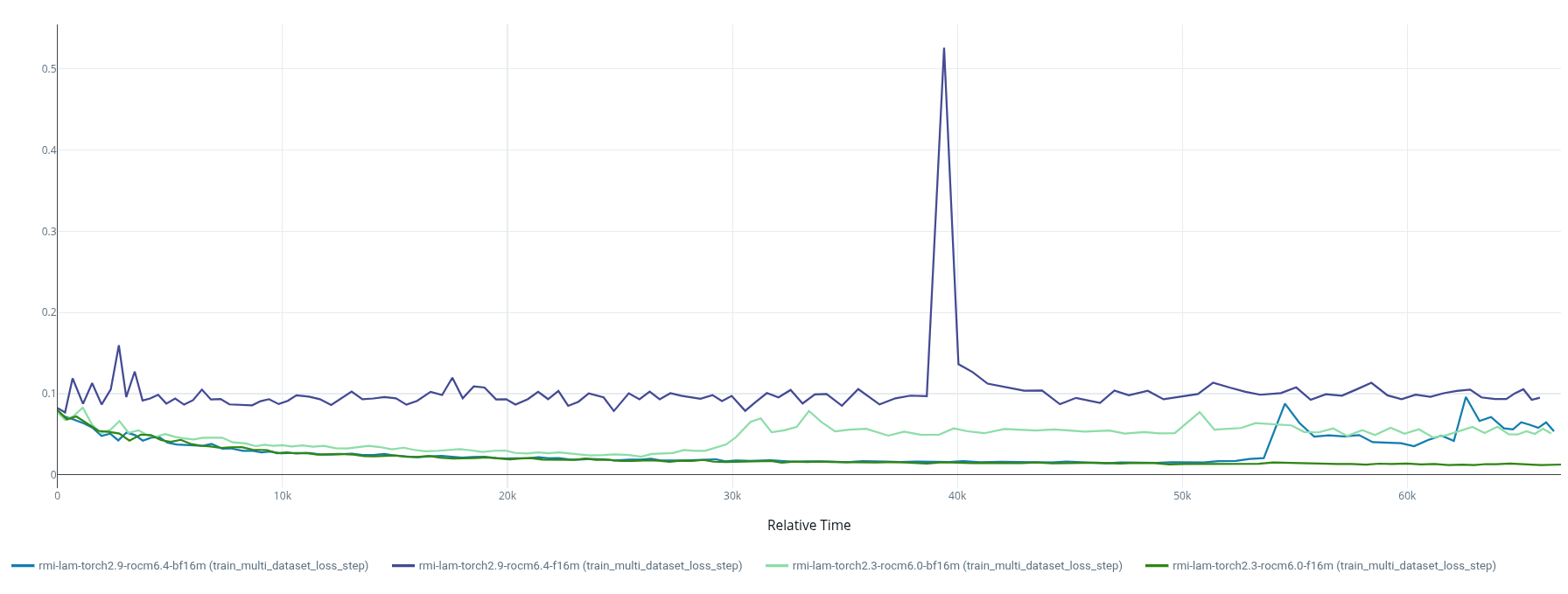
Some of our conclusions after further investigation:
-
It appears
ROCm 6.4introduces flush to zero (FTZ) which killsfp16-training for us. Testing with a single linear layer revealed a failure of the dW = input.T @ d_output GEMM in the linear backward. The root cause isROCm 6.4's FTZ: any fp16 operand below 2⁻¹⁴ ≈ 6.1×10⁻⁵ is zeroed before entering the multiply-accumulate tile. In real training (with a GradScaler of 65536), the gradient intermediates entering those GEMMs are ~3–6×10⁻⁶ — an order of magnitude below the threshold — so all weight gradients are zeroed from the first step and the model never learns. This was confirmed by per-layer gradient monitoring and comparing betweenROCm 6.0andROCm 6.4platforms. Anfp32upcast fix for the most affected linears was confirmed effective at step 0, but proved insufficient over long training as some layers re-collapse to ~15% of the rocm6.0 reference by as early as step 30. -
bfloat16's wider dynamic range means scaled gradient intermediates stay well within normal range, bypassing the MFMA FTZ problem entirely. But what we seem to see in thebf16-training runs is that coarser weight updates allow Q/K projection norms to drift upward until attention logits exceed the bf16 softmax precision limit, at which point attention collapses to one-hot outputs, a positive feedback loop accelerates norm growth, and training explodes. Possible fixes using qk-normalization or selective upcasting are under investigation.
One question we have is if the
ROCm6.4 FTZ is optional/can be disabled? We tested environment variablesROCBLAS_INTERNAL_FP16_ALT_IMPLandMIOPEN_DEBUG_CONVOLUTION_ATTRIB_FP16_ALT_IMPLwithout success. (see Torch docs on AMD precision). We also foundPyTorch TunableOp, would this help?- I encourage you to open an issue in our recipe repository. This could be useful for other users, too. –Mitja
- LUMI-provided